Get our free Shopify SEO Chrome extension
SESEO Shop Spy shows you how any Shopify store is built: how many collections, products and vendors it has, what it charges, which apps it runs and how often it blogs. It’s the first thing we open when we look at a competitor.
An x-ray bar on top of any Shopify store
Open a Shopify store and click the SESEO icon. A bar shows the store’s vitals and a side panel lists its theme, vendors and collections, each with Copy and Export buttons.
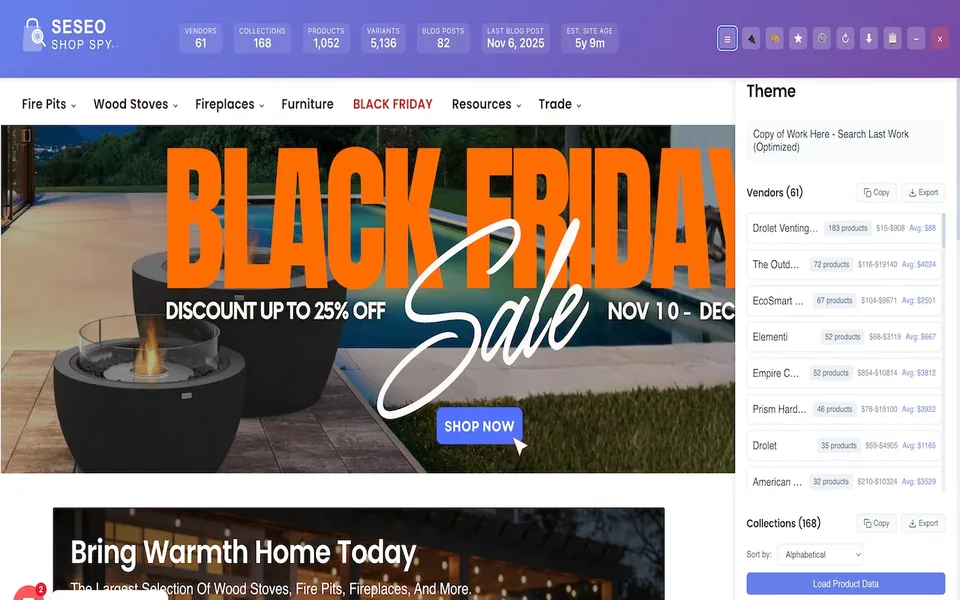
Everything a store’s homepage doesn’t tell you
Store vitals
Vendors, collections, products, variants, blog posts, the last post date and an estimated site age, in one bar across the top of the page.
Collections
The full collection list, sorted A to Z, with product data for each one. See how many category pages a competitor has built and what they called them.
Products and prices
Every product with its minimum, maximum and average price. Sort to find the low-ticket bait and the high-ticket earners.
Vendors
Every brand or supplier in the catalog and how many products each one has, so you can see who carries the store.
Apps and theme
The theme, plus the apps behind the store, grouped by type: analytics, email and SMS, live chat and more, each with a confidence label.
Blog activity
Posts per month for the last 12 months and the date of the latest post. You’ll know in seconds whether content is part of their plan.
Four SEO checks it makes quick
- 01
Count the collection pages
Collection pages are what rank for category searches. If the store at the top of Google has 168 collections and you have 12, you’ve found the gap.
- 02
Check catalog depth and price
Product count and average price are two of the six checks in our fit score. The extension gives you both for any competitor in one click.
- 03
See if they publish
A steady run of posts every month means content is driving their traffic. A blog that stopped a year ago is an opening.
- 04
Export and plan
Copy or export collections, products, vendors and apps to CSV, then plan your own structure in Sheets or Excel.
Three steps
Install it
Add SESEO Shop Spy to Chrome from the Chrome Web Store.
Open a Shopify store
Any competitor, supplier or store you want to learn from.
Click the icon
The Shop Spy panel slides in. Switch between Overview, Vendors, Apps, Collections, Products and Blog.
It runs in your browser
Shop Spy analyzes stores locally on your device. It doesn't record which websites you visit, it doesn't send the store data it shows you to our servers, and it doesn't use cookies or usage tracking. The details are in the privacy policy.
Chrome extension questions
Is SESEO Shop Spy free?
Yes. SESEO Shop Spy is free right now, with every feature included. Install it from the Chrome Web Store.
Which stores does it work on?
It is built for Shopify stores. Open it on any Shopify storefront to see the full panel.
Does it collect my data?
It analyzes stores locally in your browser. It does not track your browsing history, send the store data it shows you to our servers or use cookies. The privacy policy at ecomseotools.com has the full details.
Who made it?
Zack Franklin and the SmartEcomSEO team. It is published on the Chrome Web Store as SESEO Shop Spy.
See how any Shopify store is built
Free, with every feature included. Built by the SmartEcomSEO team.